On this page
Most SEO data sources give you a tool’s view of what happened. A crawler tells you what it found when it visited. Search Console gives you a summarised, sampled version of what Google did. Rank trackers tell you what one data centre saw on one day.
Server logs tell you what Googlebot actually requested, when it requested it, and what your server sent back. Nothing sits between you and the event, and on any site above a few thousand URLs, logs regularly overturn conclusions drawn from everything else.
Here’s how I work with them.
What Search Console’s crawl stats leave out
The Crawl Stats report is useful, but it doesn’t replace logs. It gives you totals for roughly the last 90 days, broken down by response code, file type, purpose and Googlebot type, plus a small sample of example URLs.
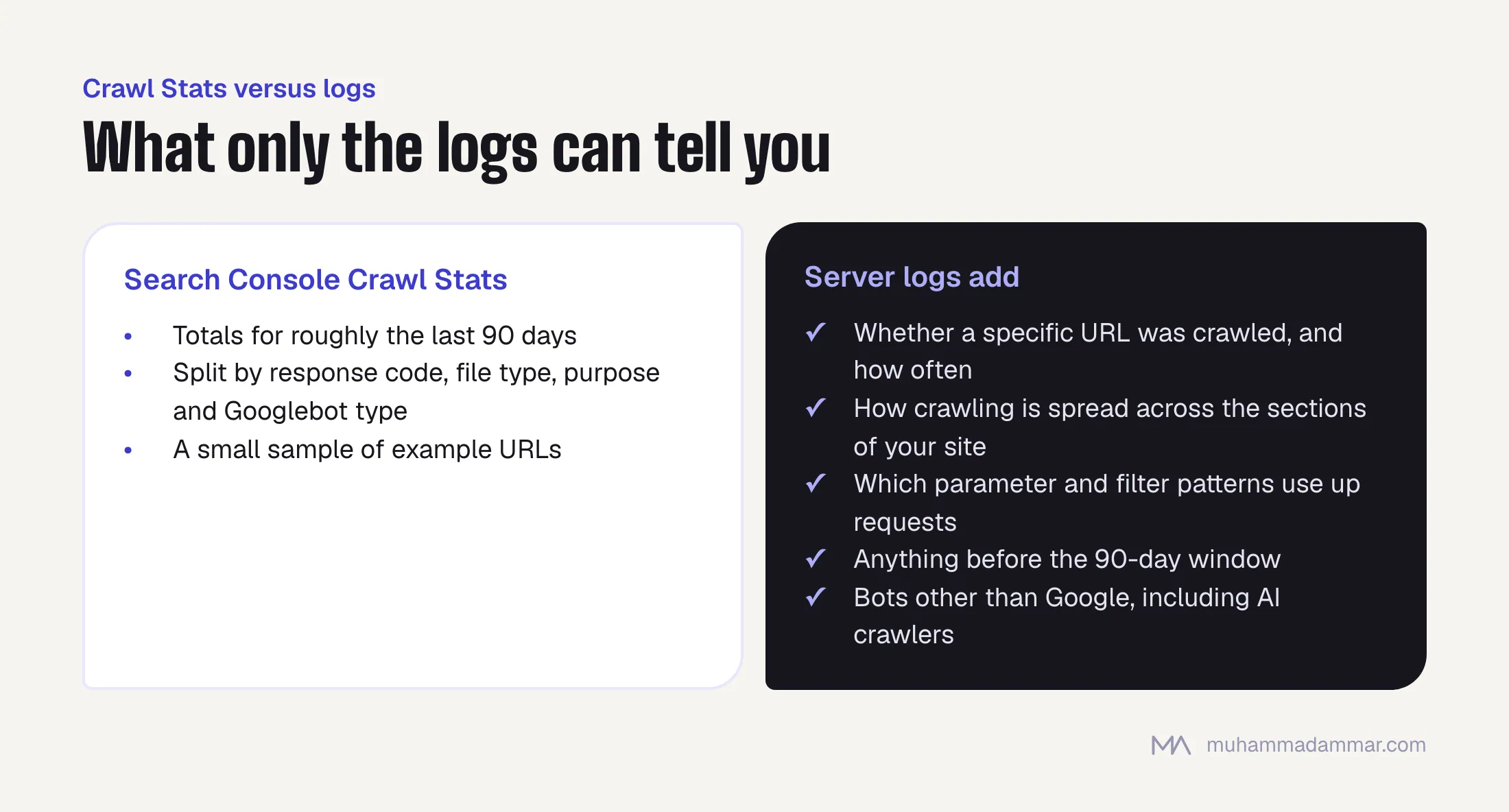
What it can’t tell you:
- Whether a specific URL was crawled, and how often. The examples are a sample, not a full list.
- How crawling is spread across the sections of your site, which is the most important question on a large site.
- Which parameter or filter patterns are using up requests, and how many.
- Anything from before the 90-day window.
- Anything about bots other than Google, which matters more now that AI crawlers make up a real share of traffic.
So Crawl Stats might tell you that 18% of requests returned a 404, but not which template produces them. Logs will.
Getting hold of the logs
This step stops most log projects, and the obstacle is usually admin work, not technology. Ask for the logs early.
cPanel shared hosting. Look for “Raw Access Logs” under Metrics. Turn on archiving before you need it. Many hosts delete logs when they rotate them, so if archiving is off, last month is already gone. You’ll get gzipped files in Apache combined format.
A VPS or dedicated server. Apache writes to /var/log/apache2/access.log on Debian-based systems or /var/log/httpd/access_log on Red Hat-based ones. Nginx writes to /var/log/nginx/access.log. Older rotated files sit next to them, numbered and gzipped. Check how long logrotate keeps them before you assume you have 30 days.
Behind Cloudflare or another CDN. This is the trap. When the CDN serves a cached page, the request never reaches your server, so your server logs undercount Googlebot, sometimes by a lot. You need the CDN’s own logs, which on Cloudflare means Logpush on an Enterprise plan. Without them, read your server logs knowing they only show requests that reached the server, and say so in the report instead of quietly reporting a number that’s wrong.
Managed WordPress hosting. Most providers make access logs available somewhere in the dashboard or through support. Ask for at least 30 days of raw logs, not a ready-made analytics view.
One line in Apache combined format looks like this:
66.249.66.1 - - [12/Sep/2026:09:14:22 +0300] "GET /ar/services/seo/ HTTP/1.1" 200 18342 "-" "Mozilla/5.0 (compatible; Googlebot/2.1; +http://www.google.com/bot.html)"That’s the IP, timestamp, request, status code, bytes sent, referrer and user agent. Everything below is built from those fields.
Checking it’s really Googlebot
Do this before any analysis. The Googlebot user agent is easy to fake, and a fair share of “Googlebot” traffic in raw logs is scrapers, competitors’ tools and bots looking for vulnerabilities. Analysing unverified traffic gives you confident nonsense.
There are two ways to verify, and the second scales better.
Reverse, then forward DNS. Run a reverse lookup on the IP. A real Googlebot IP resolves to a hostname ending in googlebot.com or google.com. Then look up that hostname and check it resolves back to the same IP. You need both directions, because the reverse lookup alone can be faked.
host 66.249.66.1
# 1.66.249.66.in-addr.arpa domain name pointer crawl-66-249-66-1.googlebot.com.
host crawl-66-249-66-1.googlebot.com
# crawl-66-249-66-1.googlebot.com has address 66.249.66.1
Google’s published IP ranges. Google publishes JSON files listing the IP ranges its crawlers use. Matching against those is much faster on a big log file than a DNS lookup per line. Match the IPs against the ranges, then spot-check a few with DNS.
While you’re at it, separate Googlebot Smartphone from Googlebot Desktop (the user agent tells you which). With mobile-first indexing, the smartphone bot’s behaviour is the one that counts.
Five questions logs can answer
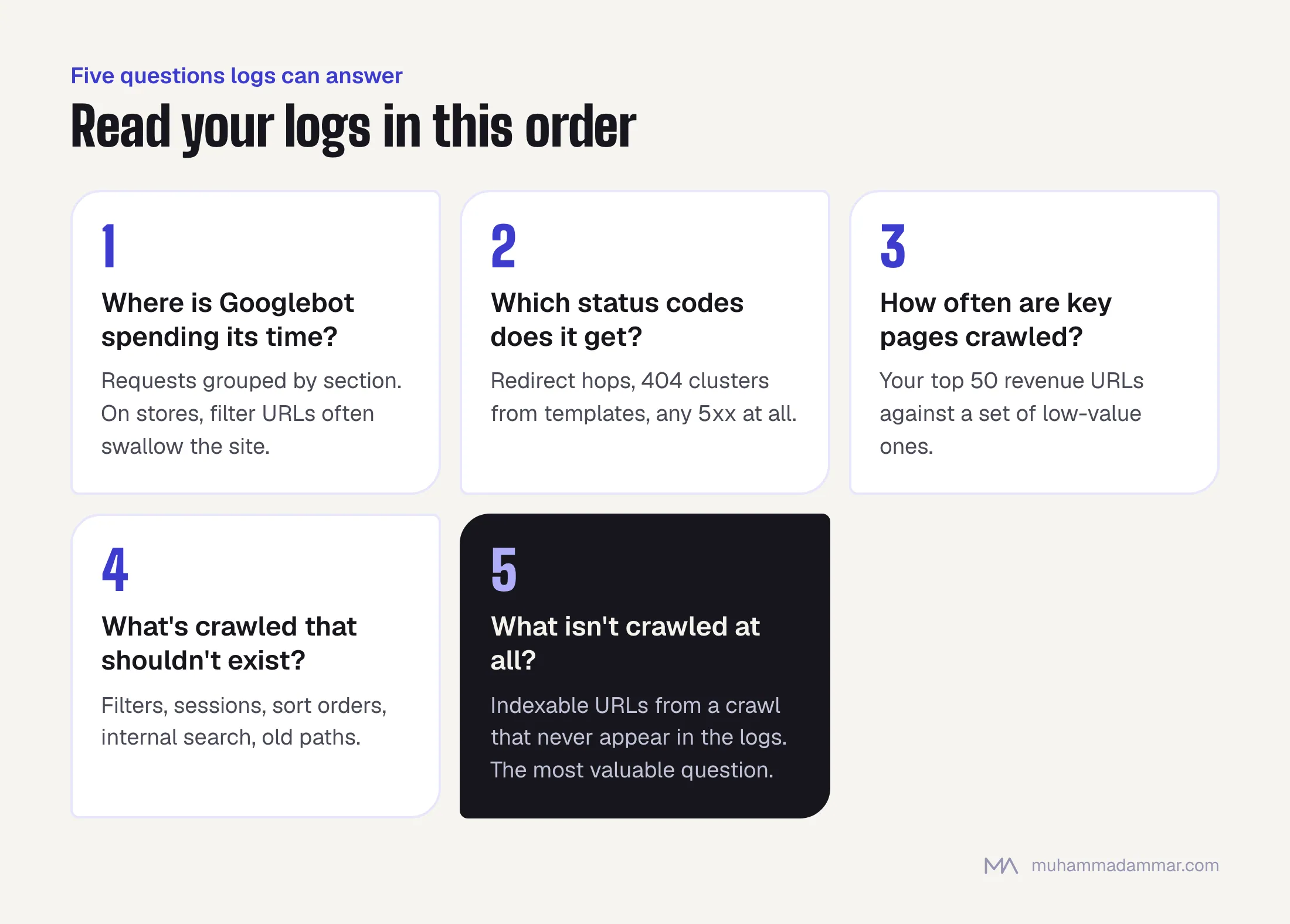
1. Where is Googlebot actually spending its time?
Group the requests by the first one or two parts of the path and count them. On a healthy site, the spread roughly follows what matters commercially. On an unhealthy one, you find most requests going to pages nobody meant to publish.
grep -i googlebot access.log \
  | awk '{print $7}' \
  | cut -d/ -f2,3 \
  | sort | uniq -c | sort -rn | head -30
This one command has started more useful conversations with clients than any dashboard I’ve built. On an online store, it’s usually where you find out that filter URLs are swallowing the site. I explain how that happens in faceted navigation and crawl budget.
2. Which status codes is Googlebot getting?
What matters is what the bot received, which isn’t always what you see in a browser.
grep -i googlebot access.log | awk '{print $9}' | sort | uniq -c | sort -rnA high share of 3xx responses means crawling is being spent on redirect hops. Clusters of 4xx point to a template linking to dead URLs. Any 5xx at all needs attention straight away: servers that return errors to Googlebot get crawled less, and the effect builds up quietly. Isolate rate-limited responses too, because they mean your own server is the bottleneck.
3. How often are your important pages crawled?
Take the 50 URLs that bring in the most revenue and count the requests for each over the period. Then compare them with a set of low-value URLs. If your money pages are crawled monthly while a parameter pattern is crawled every hour, you’ve found the bottleneck and you can put a number on it.
This is also how you catch pages that are crawled but never indexed. That’s a different problem with a different fix, and you can’t tell the two apart without crawl data.
4. What’s being crawled that shouldn’t exist?
Filter combinations, session parameters, sort orders, internal search results, old staging paths, URL structures from a migration two years ago. Pull out the distinct query parameters and look at what Googlebot spends its requests on.
grep -i googlebot access.log | awk '{print $7}' | grep '?' \
  | sed 's/.*?//' | tr '&' '\n' | cut -d= -f1 \
  | sort | uniq -c | sort -rn | head -20
5. What isn’t being crawled at all?
This is the most valuable question, and it needs a second dataset. Crawl the site, export the list of indexable URLs, and remove every URL that appears in the logs. What’s left are pages Googlebot didn’t visit in that period, usually orphan pages, pages buried too deep, or pages you can only reach through JavaScript navigation.
I don’t know another method that finds these reliably.
Turning findings into a plan
Analysis that ends with a chart doesn’t get acted on. Each finding should turn into one of four actions.
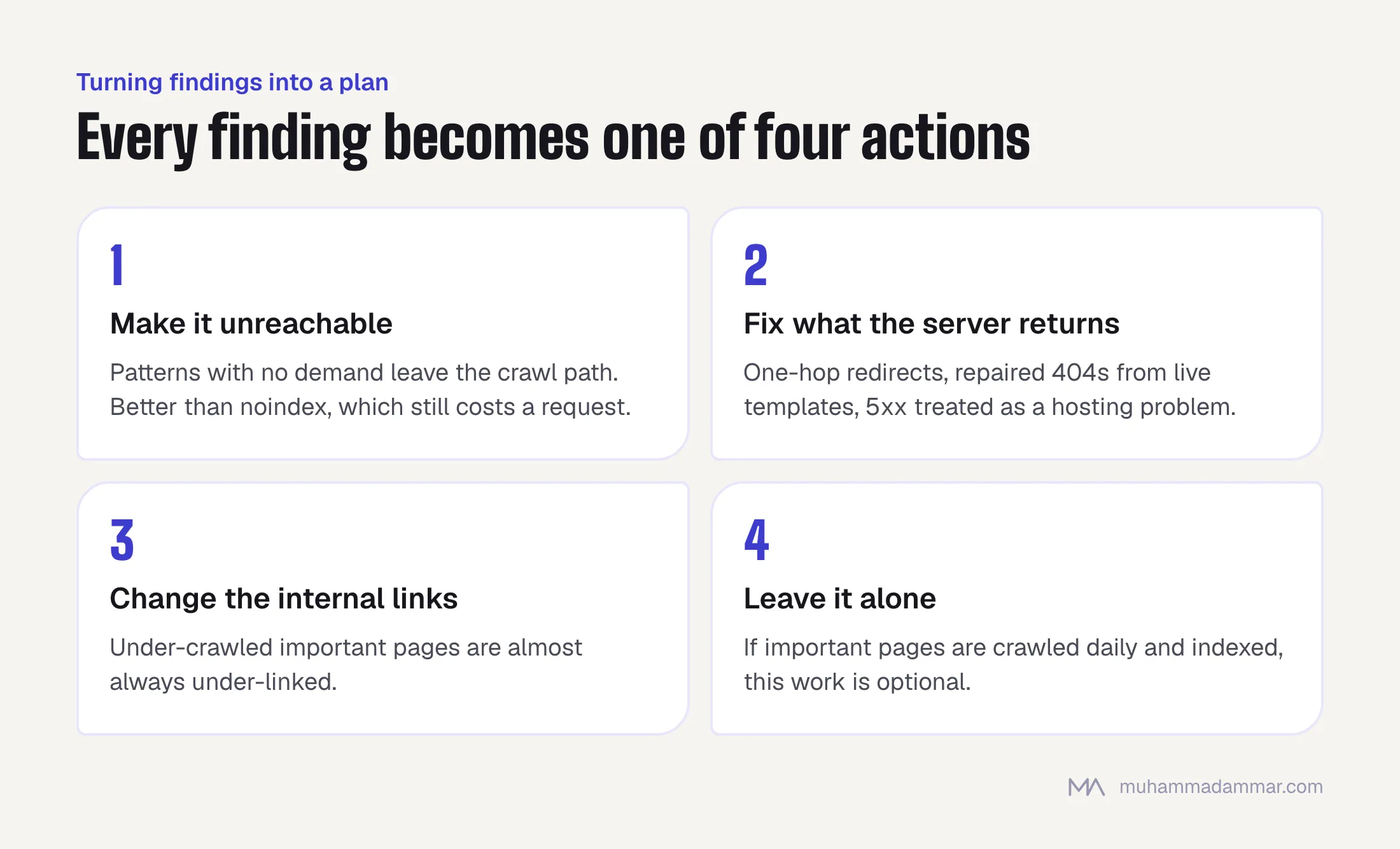
- Make it unreachable. For URL patterns with no search demand and no use to visitors, which covers most filter combinations. Taking them out of the crawl path works better than noindex, because a noindexed page still costs a request every time it’s fetched.
- Fix what the server returns. Collapse redirect chains to one hop, repair 404s coming from live templates, and treat 5xx errors as a hosting problem.
- Change the internal links. Important pages that are crawled too little are almost always linked too little. Crawl frequency follows your internal linking more closely than anything else you control.
- Leave it alone. Not every oddity in a log file is a problem, and a site with spare crawl capacity doesn’t need crawl optimisation. If your important pages are crawled daily and indexed, this whole exercise is optional.
Then pull the logs again four weeks after the change and check. Log analysis is one of the few parts of SEO where you can prove a change worked without waiting for rankings, so don’t skip that second pull.
Doing it without paid tools
Commercial log analysers are convenient, but you don’t need one for any of this.
For files up to a few hundred megabytes, the shell commands above plus sort, uniq and awk answer all five questions. For bigger files, or analysis you’ll repeat, a short Python script that loads the log into a pandas dataframe takes about twenty lines and lets you group by date, folder, status and bot type in one place.
A spreadsheet works too if you filter to verified Googlebot first and keep the row count manageable. Opening a 2 GB log file in Excel and hoping for the best doesn’t.
The tools are the easy part. The skill is knowing which questions to ask and being willing to act on answers that contradict the plan you already wrote. That’s the work I do in an SEO audit.
Frequently asked
How many days of logs do I need?
Thirty days is the practical minimum for a medium-sized site: enough to see weekly patterns and enough requests per URL to mean something. Seven days can work on a very large site that’s crawled often. Anything under seven tells you about one week, not about your site.
My host won’t give me the logs. What now?
Ask once more, properly and in writing, for the raw access logs, because front-line support often doesn’t know they exist. If the answer really is no, work from Crawl Stats, a crawl and the indexing report, and say clearly in your report that the question of where crawling goes is still unanswered.
Does this matter for a small site?
Rarely. Below a few thousand URLs, Google generally crawls everything it cares about, and crawl budget isn’t what’s holding you back. Spend the time on content and links. Logs become worth the effort when the site is large, growing fast or generating URLs automatically.
Can I see AI crawlers in the same logs?
Yes, and it’s more worthwhile every month. The same user-agent grouping shows which AI crawlers visit, how often and what they fetch. It’s the only first-hand data you have on whether your content is reaching the systems that write AI answers.
Is crawl budget real?
It’s real, and people blame it too often. Google gives each site a limited amount of crawling, based on how fast your server responds and how much it values your content. On most sites that limit isn’t the problem. On large catalogues that generate URLs without control, it definitely is, and logs are how you find out which kind of site you have.
Related: technical SEO. If you have logs and don’t know where to start, send me a message.

SEO and digital marketing consultant since 2015, working with businesses in Egypt, Saudi Arabia and the UAE.
About the author and editorial standards