On this page
Open the page indexing report on almost any WordPress site that’s been running for a few years and the indexed count will be bigger than the number of pages anyone remembers creating. Sometimes several times bigger.
Those extra pages have a cost. They’re index bloat, and on WordPress they come from a predictable list of eight places.
What index bloat actually costs you
It’s worth being precise, because this topic causes more alarm than it deserves and the real costs are narrower than people say.
Wasted crawling. This is the main cost, and it only matters on sites big enough for crawl capacity to run short. A thousand tag archives crawled every week is crawling not spent on your product pages. On a 200-page brochure site it doesn’t matter.
Pages competing with each other. More serious and more common. A tag archive listing one post can outrank the post itself for the same search, and the archive converts nothing. It happens all the time and almost nobody checks.
A weaker quality signal. Plausible, but hard to prove. If a large share of your indexed URLs are thin, it’s reasonable to think that affects how the site is judged. Treat it as a reason to tidy up, not as something you can measure.
Noisy reports. The underrated one. An index full of junk makes the coverage reports unreadable, and real problems hide in the noise for months.
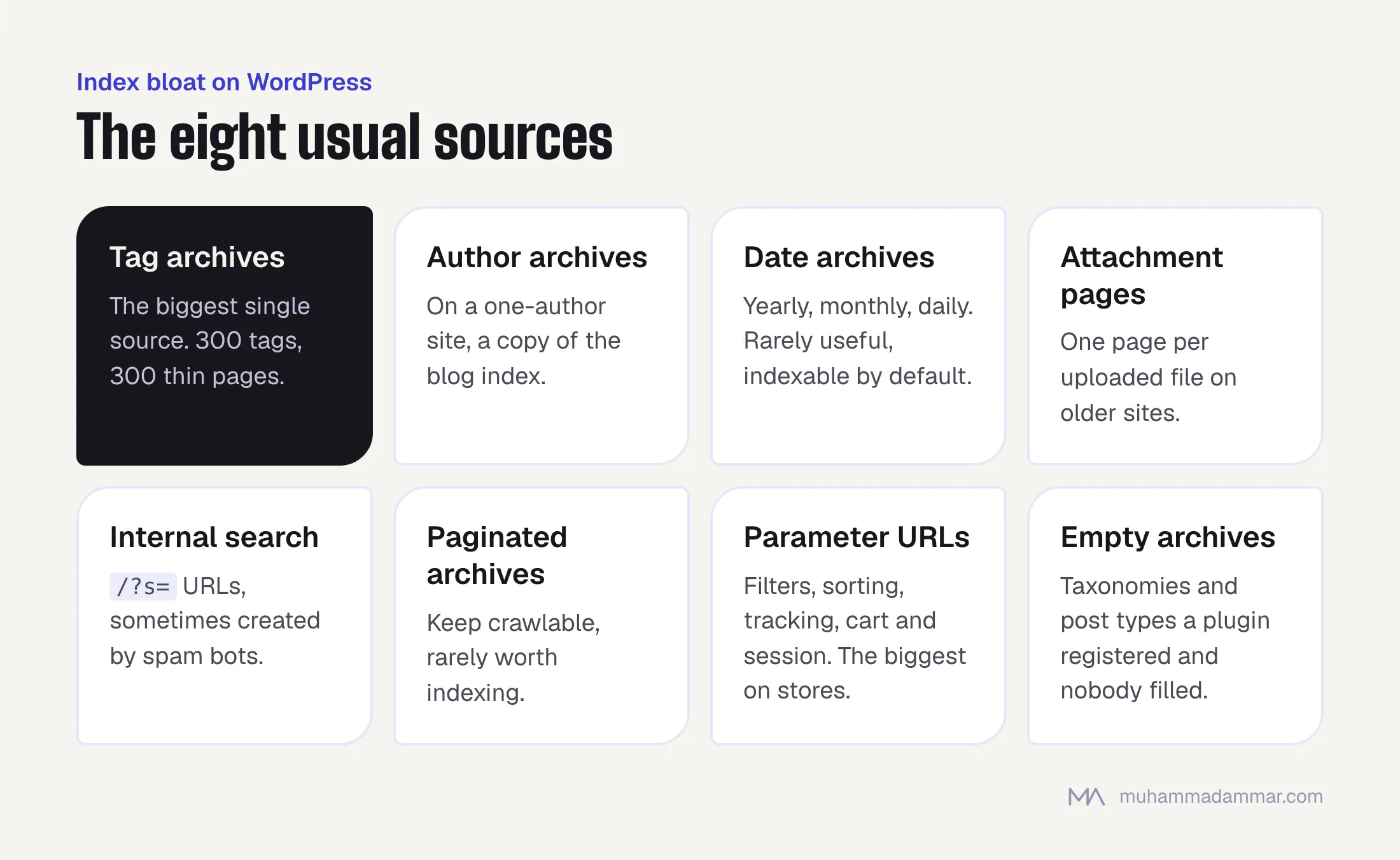
The eight usual sources on WordPress
- Tag archives. The biggest single source. Someone tags posts freely, each tag creates an indexable archive, and most of them list one or two posts. A site with 300 tags has 300 thin pages.
- Author archives. On a one-author site, the author archive duplicates the blog index. There’s no reason to index it.
- Date archives. Yearly, monthly and sometimes daily archives. Almost never useful, almost always indexable by default.
- Attachment pages. WordPress used to create a page for every uploaded file, with the image and nothing else. Newer versions handle this better, but older sites still carry hundreds of them.
- Internal search results.
/?s=URLs. If anything links to one it can be crawled, and spam bots create them on purpose. - Paginated archives. Page 2, 3 or 47 of a category. They should be crawlable so Googlebot can reach older posts, but there’s rarely a reason to index them.
- Parameter URLs. Filters, sort orders, tracking parameters, and cart and session parameters on WooCommerce. The biggest source on online stores, and the same mechanism I describe in faceted navigation and crawl budget.
- Empty taxonomies and custom post type archives. A plugin registers a post type or taxonomy with a public archive that nobody ever filled.
Two more worth a quick look: feed URLs, and comment pagination on posts with lots of comments.
Auditing what’s indexed
You want a sorted inventory, not just a total. Four steps.
Start with the page indexing report. Read the list of indexed pages, not just the count. Export it and group by URL pattern. The first part of the path usually separates the templates cleanly.
Use site: searches to sample each pattern. Narrow it to a suspect folder and see what comes back. It’s a rough tool, and the fastest way to see whether a pattern is indexed in bulk.
Crawl the site and compare. Indexed URLs your crawler can’t reach from the homepage are orphans, and indexed orphans are almost always bloat.
Check what Googlebot actually requests. On a large site, the logs show which patterns use up crawling, which tells you whether the problem is real or theoretical. The method is in log file analysis.
Then put every pattern into one of three groups: keep and improve, keep but don’t index, or remove completely. Don’t change anything until every pattern has a group.
Choosing the right tool
There are four tools for four different jobs, and using the wrong one is why cleanup projects fail.
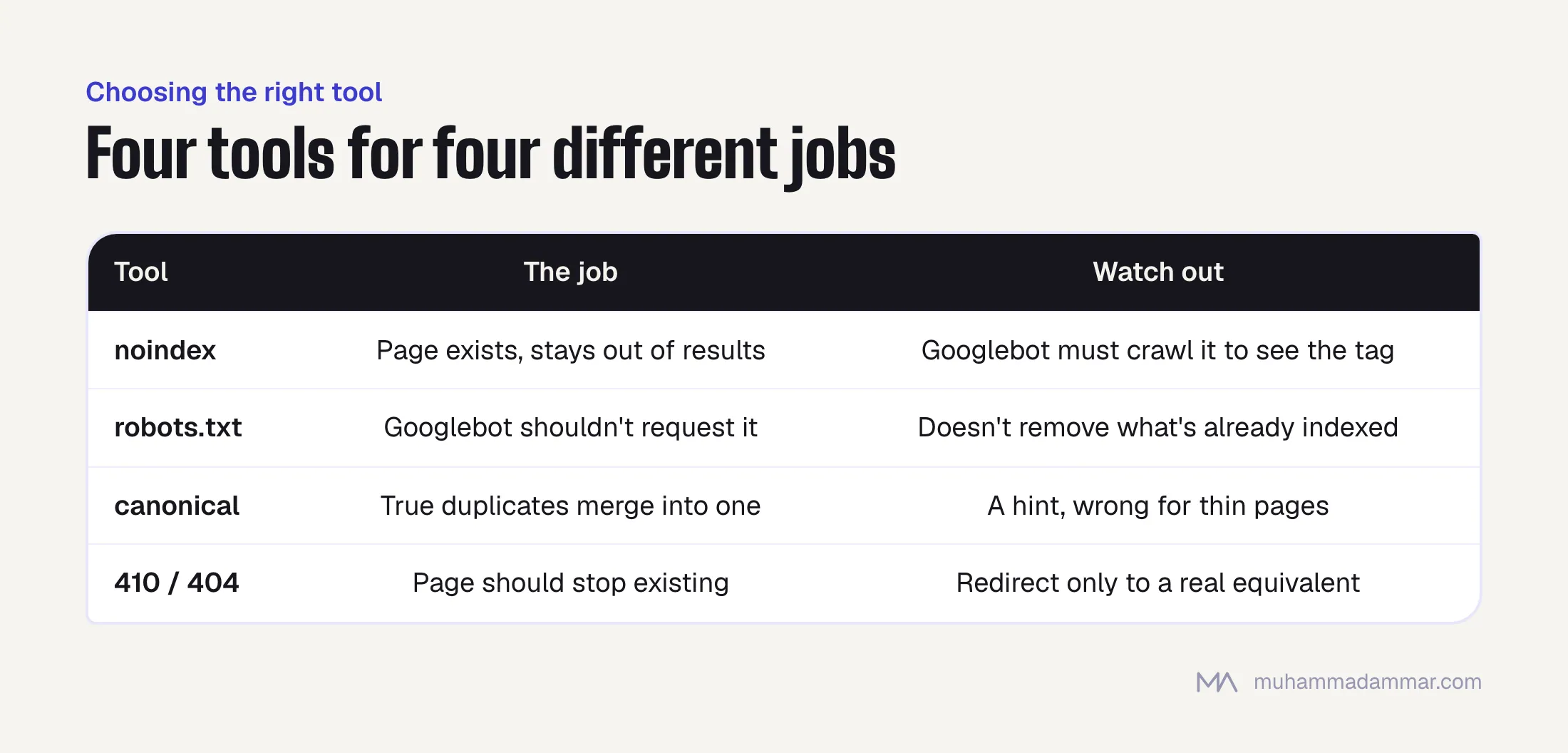
noindex: the page should exist and be crawlable but stay out of search results. It’s the right default for tag, author and date archives and for internal search pages. The page still passes on internal links, and Googlebot has to crawl it to see the instruction.
robots.txt disallow: Googlebot shouldn’t request the URL at all. It saves crawling and does not remove anything from the index. A blocked URL that was already indexed can stay there, listed without a description, for as long as it likes.
That leads to the most common mistake in this area: blocking a page in robots.txt while relying on its noindex tag. Googlebot can’t fetch the page, so it never sees the noindex, so the page stays indexed for good. If you need both, add the noindex first, wait for the page to drop out, then block it.
canonical: for true duplicates that should merge into one preferred version. It’s a hint, not an instruction, and it’s the wrong tool for pages that are just thin.
410 or 404: the page should stop existing. Use 410 when you know it’s permanent, since Google treats it a little more decisively than a 404. Redirect only when there’s a real equivalent page. Redirecting a hundred dead tag archives to the homepage creates soft 404s and fixes nothing.
A safe removal order
Order matters more than speed. Removing ten thousand URLs from the index in one afternoon is how you discover which of them were earning traffic.
- Check performance before you touch anything. Filter Search Console to each pattern and see whether it gets clicks. Now and then a tag archive is a real landing page. Those go in the “keep and improve” group.
- Add noindex and leave the pages crawlable. On WordPress this is usually a setting in your SEO plugin, not code.
- Remove the internal links pointing to them: tag clouds, archive widgets, “posted in” links to date archives. If you leave the links, crawling still flows there and the cleanup is only half done.
- Update the XML sitemaps so they list only canonical, indexable URLs.
- Wait. Dropping out of the index takes weeks, and months on a large site. You can’t meaningfully speed it up for a whole pattern.
- Only then consider a robots.txt block, and only if the logs show Googlebot still spending real crawling on those URLs.
- For pages that shouldn’t exist at all, return a 410 instead of keeping them noindexed forever.
One pattern at a time, biggest first. If something goes wrong, you want to know which change caused it.
Measuring the effect
Set expectations before you start, because the headline number moves the wrong way first.
The indexed page count falls. That’s the goal, but it’ll look alarming in any report that treats “pages indexed” as a success. Rename that chart before the cleanup, not after.
What to watch instead: crawling shifting toward the pages you care about (in the logs), important URLs being crawled more often, coverage reports becoming readable, and the internal competition disappearing. Check whether the real page now ranks for the search its tag archive used to take.
What not to expect: a jump in traffic. On most sites, removing bloat prevents problems more than it creates gains. When it does bring a visible lift, it’s usually because the internal competition was resolved, not because the index got smaller.
Frequently asked
Should I noindex tag archives?
Usually, yes. The exception is a site that uses tags as a real, curated taxonomy with substantial archives that earn clicks. If your tags were made up on the fly while writing, noindex them.
Does index bloat cause a penalty?
No. There’s no penalty for thin pages being indexed. The costs are wasted crawling, pages competing with each other and unreadable reports. Real, but not a punishment.
How long does it take for pages to drop out?
Weeks for a small pattern, months for tens of thousands of URLs. It depends on how often Googlebot recrawls those pages, which is why blocking them in robots.txt makes it slower, not faster.
Can I use the removals tool to speed it up?
Only in emergencies. It hides URLs temporarily instead of removing them, and the real fix still has to be in place. It’s useful when something confidential got indexed, not for a cleanup project.
My site has 400 indexed pages and I wrote 60. Is that a problem?
Worth tidying, not urgent. At that size crawling isn’t your bottleneck. Check whether an archive is outranking a real post and fix that, then noindex the rest when you have time.
Related: technical SEO. If your indexed count looks wrong, message me and I’ll tell you where the extra pages are coming from.

SEO and digital marketing consultant since 2015, working with businesses in Egypt, Saudi Arabia and the UAE.
About the author and editorial standards