On this page
- Why hreflang matters more on Arabic sites
- Mistake 1: tags that don’t point back
- Mistake 2: x-default pointing at the English homepage
- Mistake 3: ar, ar-SA or ar-EG
- Mistake 4: hreflang on non-canonical URLs
- Mistake 5: changed slugs that break the pair
- Mistake 6: Polylang and WPML settings nobody checks
- Mistake 7: sitemap and page tags that disagree
- How to check your site in ten minutes
- Frequently asked
Hreflang is the piece of technical SEO that breaks most often on two-language Arabic sites, and it breaks quietly. There are no errors and nothing drops out of the index. Arabic searchers just don’t get your Arabic pages the way you assumed, and your English pages pick up searches that should have gone to the Arabic ones.
Seven mistakes explain nearly every case I’ve audited. Here they are, with the fix for each.
Why hreflang matters more on Arabic sites
On a French and English site, the two versions look completely different to a search engine: different words, different sentence structure. Google can tell them apart from the content alone, and hreflang mostly fine-tunes which one appears.
Arabic sites have three extra problems on top of that.
First, many “Arabic” pages in this region aren’t fully Arabic. They’re English pages with an Arabic layer added: translated headings, English product names, English navigation and an English footer. The language signal is muddy, so Google’s automatic detection has less to go on and your explicit annotation carries more weight.
Second, Arabic covers many countries with one language code and very different buying behaviour. Saudi Arabia, Egypt and the UAE are one language and three markets. Region codes in hreflang exist for exactly this situation, and it’s also where people overcomplicate things.
Third, many of these sites run on WordPress with Polylang or WPML, which generate hreflang automatically. And because it’s automatic, nobody checks it.
Mistake 1: tags that don’t point back
This is by far the most common failure, and it cancels the whole annotation.

Hreflang works both ways. If your English page points to the Arabic page, the Arabic page has to point back to the English one, and each page also has to list itself. If the return link is missing, Google treats the annotation as unconfirmed and ignores it. You won’t see an error anywhere. It simply does nothing.
The usual causes: someone added the tags by hand to the English template only, the Arabic page was published later and never got its pair, or a translation was unpublished and the tag kept pointing at it.
The fix: for every annotated page, open both URLs and check that each one lists every version, itself included. A complete pair looks like this on both pages:
<link rel="alternate" hreflang="en" href="https://example.com/services/seo/" />
<link rel="alternate" hreflang="ar" href="https://example.com/ar/services/seo/" />
<link rel="alternate" hreflang="x-default" href="https://example.com/services/seo/" />
Mistake 2: x-default pointing at the English homepage
I find this on most two-language sites I audit: every page, in both languages, declares x-default as the homepage.
x-default names the page to fall back on when no language version matches the visitor. That’s either a language selector or the default version of that same page. It’s set per page. Pointing it at the homepage from a product page tells Google that the fallback for that product is the homepage, which isn’t what anyone intends.
The fix: set x-default per page to the version you want as that page’s default, or leave it out. Leaving it out is a valid choice. Setting it wrong isn’t.
Mistake 3: ar, ar-SA or ar-EG
You can use a language code on its own (ar) or a language plus a region (ar-SA, ar-EG, ar-AE). The region part is a country code. It says nothing about dialect, and this is where people start overcomplicating.
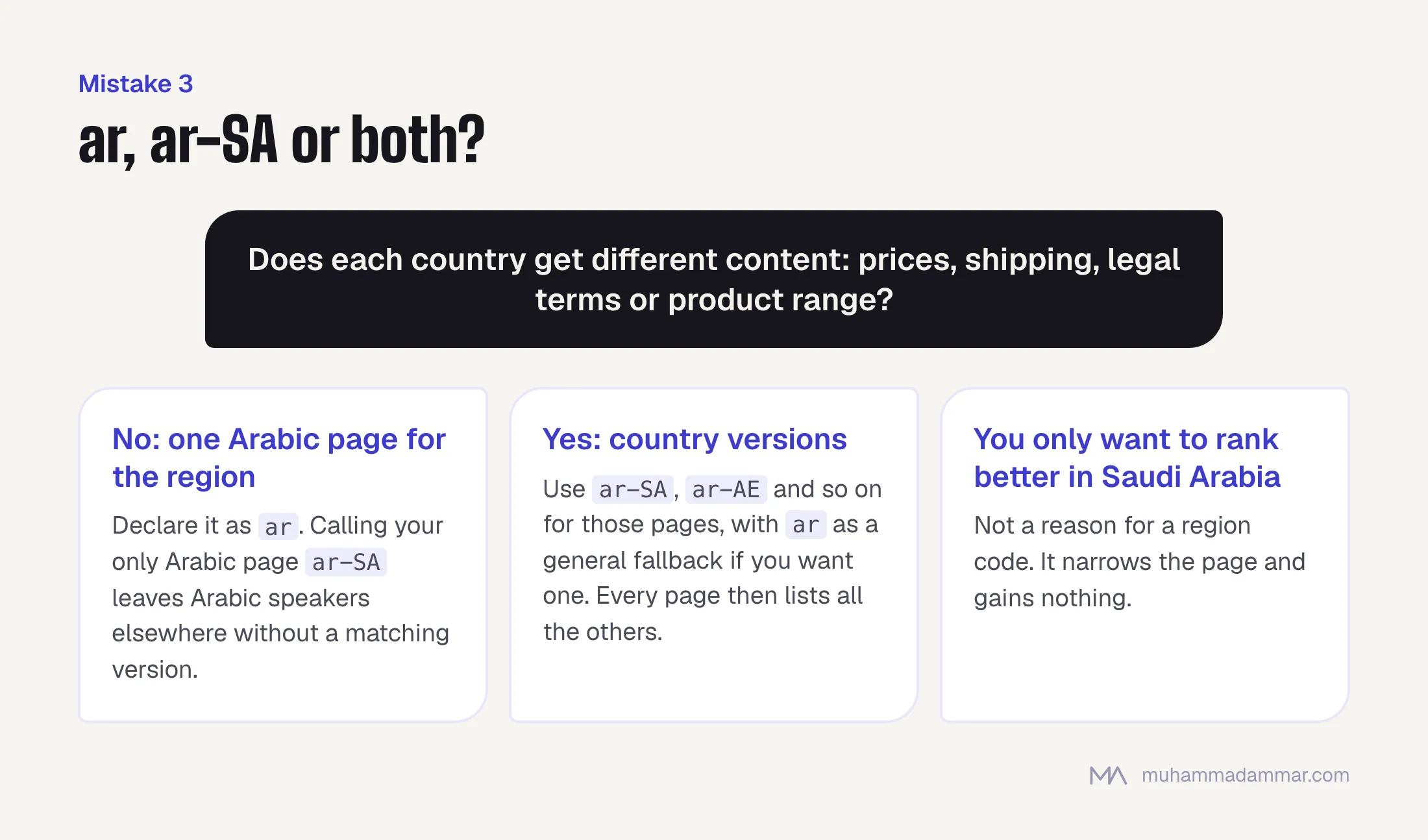
My rule: use a region code only when that region gets different content. Different prices, shipping, legal terms or product range justify separate ar-SA and ar-AE pages. Wanting to rank better in Saudi Arabia doesn’t.
If one Arabic page serves the whole region, declare it as ar. Calling your only Arabic page ar-SA narrows it for no benefit and leaves every Arabic speaker outside Saudi Arabia without a matching version.
A mixed setup is also valid: ar as a general fallback next to ar-SA and ar-AE versions for two specific markets. It’s often the right structure for e-commerce. Just remember that every one of those pages then needs the full set of tags pointing at all the others.
Mistake 4: hreflang on non-canonical URLs
Hreflang and the canonical tag have to agree. When they conflict, Google drops the hreflang.
A conflict looks like this: page A has hreflang tags, but its canonical tag points to page B. You’ve told Google that A isn’t the version to index and, at the same time, that A is the Arabic version of something. Google can’t act on both.
It shows up on paginated pages, filtered URLs in online stores, URLs with tracking parameters, and any page whose canonical was set site-wide by a plugin without anyone thinking about the translations.
The fix: every URL in an hreflang set must have a canonical tag pointing to itself, and must be the URL you actually want indexed. Checking this across a whole catalogue needs a crawler, so it’s standard SEO audit work.
Mistake 5: changed slugs that break the pair
Arabic sites change their slugs more than most, because there’s a real choice between Arabic script, transliteration and English slugs, and people revisit it. Every change breaks hreflang if the URLs are hard-coded anywhere.
It goes like this: the Arabic slug changes, WordPress may or may not create a redirect, and any hand-written or cached hreflang now points to a URL that redirects or returns a 404. Pointing at a redirect is unreliable. Pointing at a 404 breaks the pair outright.
The fix: never hard-code hreflang URLs. Generate them from the translation link, so a slug change updates both sides at once, and re-crawl after any slug change. If you haven’t settled on a slug style yet, do that first. I go through the options in choosing URL slugs for an Arabic site.
Mistake 6: Polylang and WPML settings nobody checks
Both plugins output hreflang automatically and get it right for pages they know are translations of each other. The failures happen in the gaps.
Three things to check on any Polylang or WPML site:
- Pages with no linked translation. If the Arabic post exists but was never paired with the English one in the plugin, neither page gets hreflang. The content is there but the link between them isn’t. This is the most common Polylang problem I find, and you can’t see it until you view the page source.
- The language code the plugin outputs. Check whether it’s
aror a regional code, and whether that matches what you decided under mistake 3. It’s a setting, and the default isn’t always what you want. - A second source of hreflang. If an SEO plugin also outputs hreflang, or the theme hard-codes tags in the header, you can end up with two sets that disagree. Keep one source.
One Polylang trap: pages that exist in only one language are fine, but don’t assume a language switcher on those pages does anything for hreflang. It doesn’t.
Mistake 7: sitemap and page tags that disagree
You can declare hreflang in the page head, in the XML sitemap or in HTTP headers. All three work. Using more than one and having them disagree doesn’t.
This usually happens after a migration. One plugin builds the sitemap with the old URL structure, another adds head tags with the new one, and nobody looks at the sitemap because it’s generated automatically and seems to work.
The fix: pick one method and turn the others off. On most WordPress sites the simplest to keep correct is head tags from the multilingual plugin, because they come from the same link that defines the translation.
How to check your site in ten minutes
Search Console’s International Targeting report, which used to list hreflang errors, has been retired, so checking is now a matter of looking at the pages and crawling.
- Pick three pages: the homepage, one service or category page and one deep page. Deep pages fail much more often than the homepage, so checking only the homepage gives you false comfort.
- View the source of each and read the actual tags, in the rendered head, not on a plugin’s settings screen.
- Follow every link and check the return tag. That’s what breaks most, and checking three pages by hand catches a site-wide fault straight away.
- Check that each URL’s canonical points to itself and that it returns a 200, not a redirect.
- Crawl the site with hreflang extraction turned on to catch the rest. Any crawler that reports missing return links will find in ten minutes what you can’t by hand.
- Check the sitemap for a second set of hreflang tags that disagrees with the first.
If the problems show up across whole templates and not just on single pages, the cause is in whatever generates the tags, and fixing pages one by one will waste your time. At that point it’s a technical SEO job.
Frequently asked
Does hreflang improve rankings?
Not directly. It decides which of your versions each visitor sees, and stops your two language versions being treated as duplicates of each other. The gain is the right page showing for the right audience, which can look like a ranking jump in your reports.
Should I use ar or ar-SA?
ar, unless different countries get different content. A region code on your only Arabic page narrows its reach and gains you nothing.
What if a page exists in Arabic but not in English?
That’s fine. It gets no hreflang, or one that points to itself, and nothing breaks. Don’t create a thin English translation just to make the tags look symmetrical.
Can hreflang fix duplicate content between my Arabic and English pages?
Google doesn’t treat translations as duplicates, so there’s usually nothing to fix. What hreflang does is stop the two from competing for the same search. But if your “Arabic” page is mostly English text, no tag will save it. That’s a content problem, and it’s what my Arabic SEO service deals with.
How long does a fix take to work?
Google has to recrawl both pages in every pair before it trusts the tags, so expect weeks, not days, and longer on a big site that Google crawls slowly.
If you’d like me to check your hreflang setup, send me your site.

SEO and digital marketing consultant since 2015, working with businesses in Egypt, Saudi Arabia and the UAE.
About the author and editorial standards